
Panel Guide
RISCO Agility – RS232
Panel Connection – RS232
|
Manufacturer |
RISCO |
|
Model |
Agility |
|
Version |
Agility 2, 3, 4 & 5 |
|
Minimum Panel Firmware |
V2.33 |
|
Cable required? |
RISCO LightSYS & Agility Cable CS.1.202 |
|
Panel Profile |
RISCO-AGILITY V2/V3/V4-RS232 RISCO-AGILITY V5-RS232 |
|
Panel Bus Connection |
RS232 |
|
Technical Notes |
Pro will require an additional power supply due to no space for hardware and only having a 6V battery backup. Important note – Serial integration with the RISCO Agility does not provide confirmed alarms. If confirmed alarms are required please select GENERIC-MCM from the panel list in My Base, purchase a dial capture (MCM) card and use the appropriate RISCO PSTN modem. |
Panel Connection Information
|
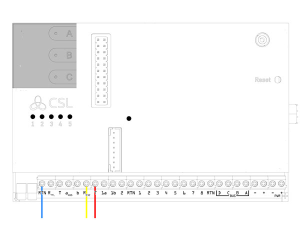
Pin |
SPT |
Colour |
|
Pin 1 |
232-T |
Red |
|
Pin 2 |
RTN |
Blue |
|
Pin 3 |
R-232 |
Yellow |
Panel Programming
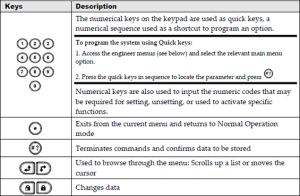
- Enter “Engineer Mode” by entering “Engineer Code”
- [Scroll to (1) System] and press [#]
- [Scroll ↓ to (2) Controls] and press [#]
- [Scroll ↓↓ to (3) Communication] and press [#]
- [Scroll ↓↓ to ARC ENABLE] and set to [N] and press [#]
- [Screen shows (3) Communication] and press [#]
- [Scroll ↓ to Config SW Enable] and set to [Y] and press [#]
- [Screen shows (3) Communication] and press [#]
- [Scroll ↓↓ to [FM ENABLE] and set to [N] and press [#]
- Press [*] 2 twice. You are now in the Main Menu
- [Scroll ↓↓↓ to (4) Communications] and press [#]
- [Scroll ↓ to (3) Config. SW] and press [#]
- Screen shows (1) Security and press [#]
- [Scroll ↓ to (2) Remote ID] and press [#]
- Modify value to [0000] and press [#]
- Screen shows (2) Remote ID] press [*] press ↓
- [Screen shows (2) Call Back] Press [#] and set Call Back En to [N] and press [#]
- Press [*]
- [Scroll ↓ (3) IP Gateway] press [#] into (1) IP Address] remove any IP Config
- [Scroll ↓ (2) IP Port] press [#] Modify value to [00000] and press [#]
- *** If you have a GSM module, remove setting from this menu ***
- Press [*] 3 times
- Screen shows (4) Communication
- Exit “Engineer Mode” [0] and press [#] this saves the data
Troubleshooting
- NOTE: RISCO Agility has two communication menus, please check you are in the correct
communication menu during panel programming. - NOTE: Panel integration only supports non-zone type alarms such as BV (Burglary Verified) on the following – DualCom Pro V2.25 & up and DualCom Pro 2 all FW versions.







