
Panel Guide
Aritech Advisor Master – RS232
Panel Connection – RS232
|
Manufacturer |
Carrier |
|
Model |
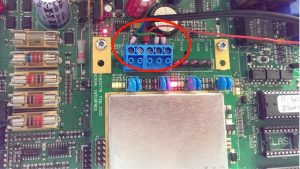
ATS Advisor Master plus serial plug on module |
|
Minimum Panel Firmware |
Please refer to panel manufacturer |
|
Cable required? |
See photo below. |
|
Panel Profile |
ARITECH-MASTER-RS232 |
|
Panel Bus Connection |
RS232 |
Panel Connection Information
|
Connection |
Panel |
|
RS232-T |
RXD |
|
RS232-R |
TXD |
|
RTN |
GND |
|
CTS |
A+ |
Cable Required
Panel Programming
Menu 9 – Communications menu
- PBX [not set]
- MSN [not set]
- DT Detection [UK]
- DTMF tone dialling [Yes]
- Enable PSTN line fault monitor [No]
- Monitor service tones [No]
- 3 digit SIA extensions [Yes]
- ISDN point to point [No]
- Enable ISDN line fault monitor [No]
- 3 digit SIA extensions [Yes]
- 200 baud reverse area open/close [No]
- X25 TEI value [2]
- Audio listen in time [180]
- Audio listen in frame time [30]
- Report mains fault [Yes]
- Report line fault [Yes]
- Enable GSM line fault monitor [No]
- Central station
- CS No <1> Enter
- Format No: (Option 7)
- Ph1
- Ph2 [not set]
- Acc No: system account number
- Acc No: area 1 account number
- Bell modem: [Yes]
- Dual reporting [No]
- Listen in [No]
- Disable reporting inhibits [No]
- Reserved [No]
- XSIA Max characters [30]
- X25 account code not important
- Conn type (Option 4)
- suppress FTC for voice reporting [No]
- Retry count [10]
- SIA Area Modifier [Yes]
- X25 D-bit [No]
- Mains Fail Reporting delay [30]
- Enable IP Line Fault Monitor [No]
- AWDGP reporting codes for IMQ [No]
Menu 29 – Computer Connections menu
- Enable Remote UpDownload [Yes]
- Up/Download if any area armed [Yes]
- Enable Remote Control [Yes or No]
- Remote Control if any area armed
- Use modem Init [No]
- Report Alarms to computer [No]
- Report Access to computer [No]
- Cmp, Cbk, Srv
- Computer Address [0001]
- Security Password [0000000000]
- Security Attempts [255]
- Number of Rings [1]
- Number of Calls [0]
- Answer Machine [No]
- Reserved [No]
- Bell Modem [No]
- Conn Type * (Option 4)
- PC connections authorised [No]
Troubleshooting
- Note for ATS 2000 panels set the connection type here as PSTN. Rather than serial interface. The connection type in menu 9 needs to remain as Universal Interface.
- *Please note without 12V to the CTS connection on the serial interface the serial board will not operate.







