
Panel Guide
GSD – TTL
Panel Connection – TTL
|
Manufacturer |
GSD |
|
Model |
GSDi-2-70-GSDi-10-70 |
|
Version |
DualCom Pro V2.15 |
|
Minimum Panel Firmware |
V2.12.43 |
|
Panel Profile |
GSD-GSD170-TTL |
|
Panel Bus Connection |
TTL |
|
Technical Notes |
Remote Manager Version – V3.3.2.0 – UDL Software |
Panel Connection Information
|
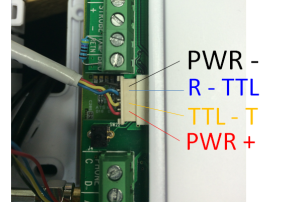
GSD Pin Out |
GSD Function |
DualCom Pro |
|
Pin Out 1 |
PWR- |
RTN |
|
Pin Out 2 |
R-TTL |
TTL-T |
|
Pin Out 3 |
TTL-T |
TTL-R |
|
Pin Out 4 |
PWR+ |
A+ |
GSD Functions
Panel Programming
- Panel default Installer code: 6666
- Panel default User 1 code: 1111
- Enter “Engineer Mode” on the panel using the engineer code
- Navigate to “Installer Menu” > “Communications” > “Alarm Rx Centres”
- Select “Communications” > “Alarm Rx Centres” > “Al. Rx. Centre 1” > enter “Menu”
- “Communications” > “Alarm Rx Centres” > “Al. Rx. Centre 1” > Name: Enter an ARC name
- “Communications” > “Alarm Rx Centres” > “Al. Rx. Centre 1” > “Account code” > Set the account code to the ARC account code”
- “Communications” > “Alarm Rx Centres” > “Al. Rx. Centre 1” > “Format” > choose “Contact ID” or “SIA”
- “Communications” > “Alarm Rx Centres” > “Al. Rx. Centre 1” > “Connection 1” > “Phone number” and enter the # symbol
- “Communications” > “Alarm Rx Centres” > “Al. Rx. Centre 1” > “Events” > “Alarms” > Select the types of alarms you wish to be reported to the ARC
- “Communications” > “Alarm Rx Centres” > “Al. Rx. Centre 1” > “Events” > “Other events” > Select the other event types you would like to be reported to the ARC
Hints & Tips
A recommended minimal selection of Alarm Events would be: ‘Set and Unset’, ‘Inhibits and Overrides’, ‘Tampers’, ‘Mains Power Faults’ and ‘Battery Faults’.







