
RISCO LightSYS+ – TTL
Panel Connection – TTL
|
Manufacturer |
RISCO |
|
Model |
LightSYS+ |
|
Version |
3.0.1.10 |
|
Cable required? |
Custom cable |
|
Panel Profile |
RISCO-LITESYSPLUS-TTL |
|
Panel Connection |
TTL |
|
Technical Notes |
DualCom Pro 1: not supported. DualCom Pro 2 & 3: firmware must be v3.3.1 or higher. Panel integration supports a maximum of 50 zones. DualCom Pro 4: all firmware is supported. There is no limitation on the number of zones supported by panel integration.
|
Panel Connection Information
|
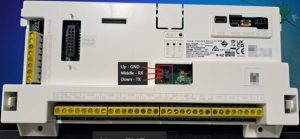
TTL-T |
Panel Middle RX |
|
TTL-R |
Panel Down TX |
|
RTN |
Panel Up GND |
DualCom Pro to Panel Wiring
Panel Setup
- Select Programming and press OK.
- Select System and press OK.
- Select Communication and press OK.
- Refer to the table below for the information about the specific variants:
DualCom Pro Versions
|
DualCom Pro 4 |
DualCom Pro 2 & 3 |
|
Set ARC Enable / MS Enable to Y. Set FM Enable to N. Set CS Enable to Y. Set EXTERNAL com to Y. Cloud Enable can be set to any value. If Cloud Enable is set to Y then ARC CALL ALL/MS CALL ALL must also be set to Y. *Back out using the back arrow button until you are back at ‘Programming:’, then select* 5) Communication > Ensure the Remote ID is set to ‘0000’. Back out until you get to ‘Programming’, press 0, then confirm exiting of Engineer Mode. |
Set ARC Enable/MS Enable to N. Set FM Enable to N. Set CS Enable to Y. Cloud Enable can be set to any value. Set External COM to Y. *Back out using the back arrow button until you are back at ‘Programming:’, then select* 5) Communication > Ensure the Remote ID is set to ‘0000’. Back out until you get to ‘Programming’, press 0, then confirm exiting of Engineer Mode. |







