
Panel Guide
Aritech 2X Series – RS232
Panel Connection – RS232
|
Manufacturer |
Carrier |
|
Model |
Aritech 2X-F2-S Fire Panel with Panel Isolator Board 2010-2-232-IB |
|
Version |
N/A |
|
Cable required? |
Aritech 2010-2-232-C30 |
|
Panel Profile |
ARITECH-2XF2S-RS232 |
|
Panel Bus Connection |
RS232 |
|
Technical Notes |
The panel isolator board must be plugged into the panel’s COM1 port. If an EN54-compliant installation is required, please also follow the instructions in the DualCom Pro 2 Fire EN54 Variant Quick Guide.
|
Panel Connection Information
|
Connection |
Panel |
|
RS232-T |
Socket Pin 3 |
|
RS232-R |
Socket Pin 1 |
|
RTN |
Socket Pin 5 |
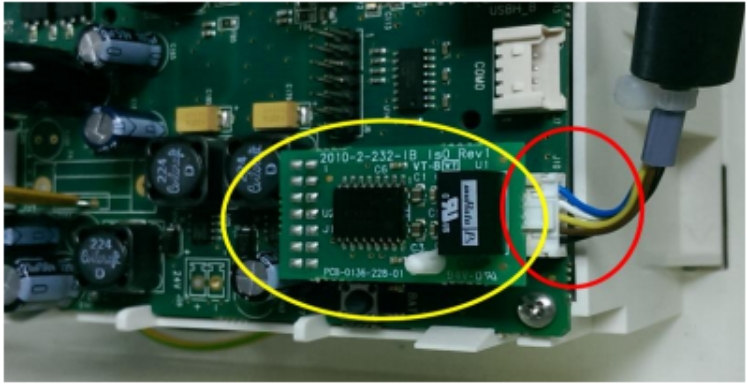
IMPORTANT – The panel isolator board must be plugged into the panel’s COM1 port.
Panel Programming
- Navigate to [Printer config] and press [Enter].
- Navigate to [Ext printer config] and press [Enter].
- Set baud rate for the Ext printer port to 19200.
- Select [Used] and remove [tick]. This will deselect COM0 port and enable COM1 port.
- Select which events to print








