
Advanced MX Pro 4/5 – RS232
Panel Connection – RS232
|
Manufacturer |
Advanced |
|
Model |
MX Pro 4/5 |
|
Cable required? |
Core alarm cable |
|
Panel Profile |
ADVANCED-MXPRO-PRINTER |
|
Panel Connection |
RS232 |
|
Technical Notes |
Apollo protocol was set during testing. Any unrecognised panel event will be delivered as SIA YO unknown messages. If an EN54 compliant installation is required, please also follow the instructions in the DualCom Pro 2 Fire EN54 Variant Quick Guide. |
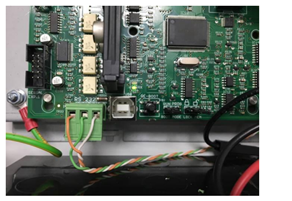
DualCom Pro to Panel Wiring
|
RS232-T |
Right Pin (White) |
|
RS232-R |
Left Pin (Orange) |
|
RTN |
Centre Pin (Green) |
Panel Connection
Panel Setup
Setup-Printer>
Tick “External”
Tick “Fires”
Tick “Alarms”
Tick “Faults”
Tick “Tests” if you want to see alarms in Fire-Test mode.
Troubleshooting
Integrating with the Advanced MxPro 5 panel may generate earth faults when connecting to the DualCom Pro. If this is the case, install the Advanced MxPro 24VDC – 24VDC Convertor/Isolator Module (MXP-542) between the DualCom Pro power terminals and the power supply.







