
Panel Guide
RISCO Gardtec – Dial Capture
Panel Connection – Dial Capture
|
Manufacturer |
RISCO |
|
Model |
Gardtec 600 Series |
|
Version |
N/A |
|
Minimum Panel Firmware |
N/A |
|
Cable required? |
MCM connected to: DualCom Pro 1 – MCM plug-on module CS.1.402 |
|
Panel Profile |
GARDTEC-MCM |
|
Panel Connection |
Dial Capture |
|
Technical Notes |
Only SIA is supported. If Fast Format is required use GENERIC-ALARMS-MCM as Panel Profile. |
DualCom Pro to Panel Wiring
|
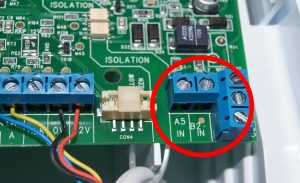
DualCom Pro 1 – MCM plug-on module – Line A |
PSTN A |
|
DualCom Pro 1 – MCM plug-on module – Line B |
PSTN B |
Panel Configuration
Set up Alarm Format:
- Enter Keypad Access Code to get into Engineer mode (Default is 1234) followed by [YES]
- Press [3] [4] [YES] to jump to Digicom
- Press [NO] until you see ‘Mod + SIA’
- Press [YES]
- Press [0]
- Press [NO] until you see ‘Program Digicom Type or Test?’
- Press [NO] until you see ‘Program Digicom Functions?’
- Press [YES] [YES] (To change channels/triggers)
- Press [NO] once
- Press [YES] until the “>” appears next to PA
- Press [NO] to change the ‘Off’ to ‘On’
- Press [YES] [YES]
- Press [0] repeatedly to get out of Engineer mode
Set up Communication and line monitor security:
- Enter Keypad Access Code to get into Engineer mode (Default is 1234) followed by [YES]
- Press [3] [4] [YES] to jump to Digicom
- Press [0] (go back)
- Press [NO] until you see ‘Functions’
- Press [YES]
- Press [NO] until you see ‘Comms Functions’
- Press [YES]
- Press [NO] until you see‘Comms=On’
- Press [YES]
- Press [NO] and key in the required Site Code/Id
- Press [YES]
- Press [NO] and key in the required ARC telephone number
- Press [YES]
- Press [YES] till you see ‘Line Monitor’
- Press [NO] till you see ‘Line Volts’
- Press [YES]
- Press [[NO] till you see ‘Line Security’
- Press [NO]until ‘Low’ to set Line Monitor to low security
- Press [YES]
- Press [0] multiple times to get out of engineer mode







