
Panel Guide
Ksenia Lares DC09
Panel Connection – DC09
|
Manufacturer |
Ksenia |
|
Model |
Lares |
|
Version |
4.0 |
|
Cable required? |
Ethernet Cable (CS.1.301) |
|
Panel Profile |
DC09-SIA-IP |
|
Panel Connection |
TCP/IP using IPv4 |
DualCom Pro to Panel Wiring
The DualCom Pro can be connected direct to the Lares 4.0 or via the PoE card as in the diagrams below.
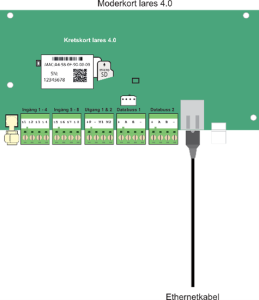
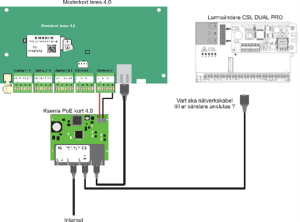
DualCom Pro Setup
The DualCom Pro is compatible with SIA DC-09-2021 and will transmit any SIA Alarms received, without modification, to the ARC.
The default values configured in the device are below and should be updated as appropriate. Please contact CSL Technical Support who can assist in modifying the defaults if required.
Setup
|
Variable |
Value |
|
IP Address |
DHCP |
|
Subnet Mask |
DHCP |
|
Default Gateway |
DHCP |
|
DC09 Encryption Key |
12345678123456781234567812345678 |
|
DualCom Pro DC09 IP Port |
18000 |
|
DC09 Panel Timeout |
95 Seconds |
Panel Set Up
- Create an entry under SIA IP Receiver
- Give it a description e.g. “SIA DC-09 with a CSL transmitter”
- Enable “Supervision Eth/GPRS”
- Enable “Transmit over TCP”
- Enable “Use timestamp”
- Set “Ethernet Supervision interval (sec)” to 30
- Set “IP Ethernet” to the IP address of the DualCom Pro
- Set “Port Ethernet” to 1800
- Set “GPRS Supervision interval (sec)” to 900
- Set “Supervision Mode” to ‘Only One’
- Set “Application ID” to 1234
- Create an entry under Contact Lists
- Give it a description e.g. CSL transmitter
- Set “Options” to SIA IP
- Set “SIA IP” to the SIA IP Receiver created above e.g. SIA DC-09 with a CSL transmitter
- Set up Notifications
- Select which notifications should be sent over DC09







