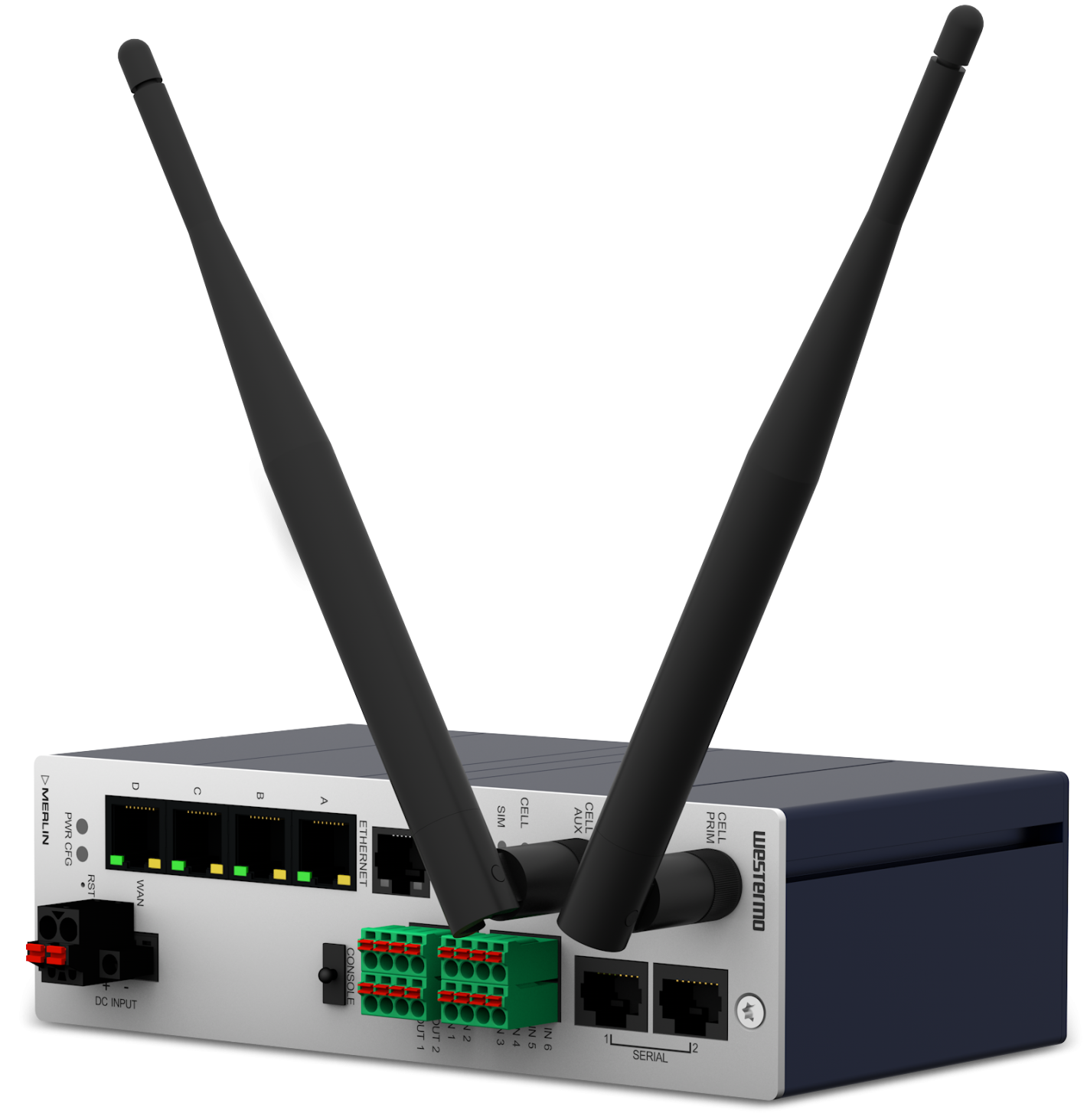
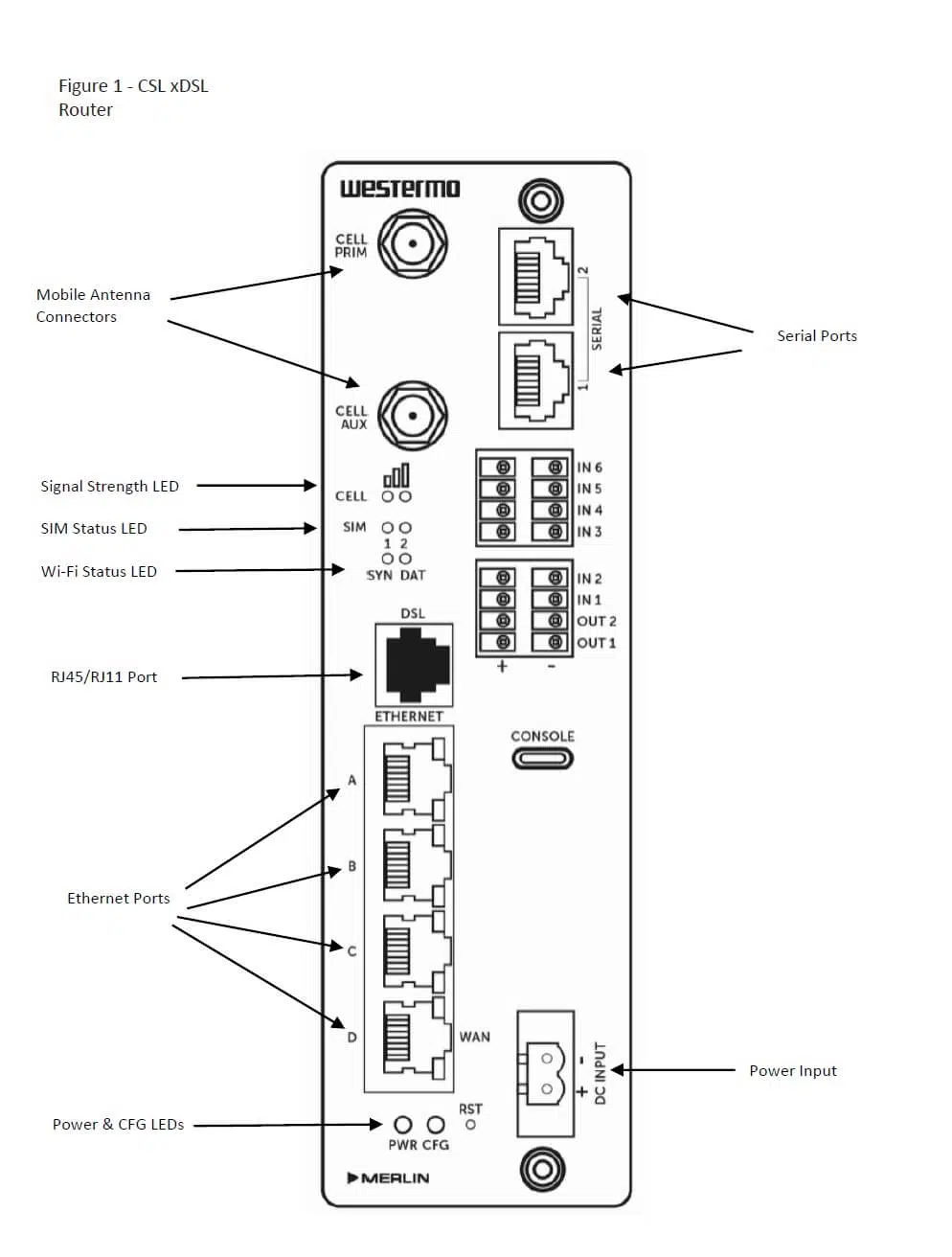
ISSUE = THE SITE IS OFF-LINE AND THE ROUTER CANNOT BE CONTACTED ON EITHER PATH
Q: Is the router powered?
A: The Power Adaptor LED and router’s POWER LED should both be on.
- If the Power LED is off when the Power Adaptor LED is off – the power source may be faulty or if ok replace the power adaptor or mains cable.
- If the Power LED is off when the Power Adaptor LED is on – replace the router.
Q: Are all xDSL connections correct and are they working reliably?
A: If SYN & DAT indicators are off please check connectors are well seated. If connections seem OK swap the filter, cables, or adaptors between the line socket and router. Customer provided telephone line extension leads or sockets may need to be checked and replaced.
Q: Is the xDSL path now OK?
A: The SYN indicator should be on and stable and the DAT indicator should be on but flashing to show data is passing through the router.
- If the SYN is on & DAT indicators is on but not flashing then contact CSL Technical Support to confirm the router’s xDSL path has restored.
- If the SYN indicator is off – the router may have recently been powered up or rebooted, wait a minute and recheck.
- If the SYN indicator persistently drops out or begins flashing then the router may be unable to sync or randomly re-syncing. If all checks in have been made to remove any connection problems then retest with a spare router, otherwise, contact the CSL Technical Support who will arrange for an xDSL test.
Q: Is the router configured correctly?
A: The CONFIG LED should be on or off but not flashing. If the CONFIG LED is flashing then contact the CSL Technical Support who will arrange the download of the site-specific configuration.
Q: Is the mobile radio path now OK?
A: Ideally, one or more signal strength LEDs should be permanently on. If all Signal Strength LEDs are off it indicates no signal is available. If the signal strength is usually OK this could indicate there may be a local transmitter fault. Contact the CSL Technical Support if this is suspected.
ISSUE = THE SITE IS OFF-LINE BUT THE ROUTER CAN BE CONTACTED BY CSL
Q: Is the ethernet connection OK?
A: The Ethernet Port’s Green LED should be on. If it is off, please ensure the connected equipment is powered, otherwise, disconnect and reconnect the Ethernet cable into the router and equipment ports. If the issue persists then replace the Ethernet cable. If the problem persists even further, contact the CSL Technical Support who will arrange to check and confirm that the router port is enabled and that the router is configured correctly.
ISSUE = THE SITE IS ON-LINE BUT THE XDSL PATH IS UNAVAILABLE
Q: Are all xDSL connections correct and are they working reliably?
A: If the SYN & DAT indicators off – Check connectors are well seated. If connections seem OK swap the filter, cables or adaptors between the line socket and router. The issue coud also be the customer’s telephone line extension leads or sockets are faulty – check these and replace if necassary.
- If the SYN is on & DAT indicators is on but not flashing then contact CSL Technical Support to confirm the router’s xDSL path has restored.
- If the SYN indicator is off – the router may have recently been powered up or rebooted, wait a minute and recheck.
- If the SYN indicator persistantly drops out or begins flashing then the router may be unable to sync or randomly re-syncing. If all checks in have been made to remove any connection problems then retest with a spare router, otherwise, contact the CSL support who will arrange for an xDSL test.
ISSUE = THE SITE IS ON-LINE BUT THE XDSL PATH IS UNAVAILABLE
Q: Are all xDSL connections correct and are they working reliably?
A: If the SYN & DAT indicators are off – Check connectors are well seated. If connections seem OK swap the filter, cables, or adaptors between the line socket and router. The issue could also be the customer’s telephone line extension leads or the socket is faulty – check these and replace them if necessary.
- If the SYN is on and the DAT indicators are on but not flashing then contact CSL Technical Support to confirm the router’s xDSL path has been restored.
- If the SYN indicator is off – the router may have recently been powered up or rebooted, wait a minute and recheck.
- If the SYN indicator persistently drops out or begins flashing then the router may be unable to sync or randomly re-syncing. If all checks in have been made to remove any connection problems then retest with a spare router, otherwise, contact the CSL support who will arrange for an xDSL test.
ISSUE = THE SITE IS ON-LINE BUT THE MOBILE RADIO PATH IS UNAVAILABLE
Q: Is the signal OK?
A: Check the signal strength LEDs. Ideally, one or more mobile signal strength LEDs should be permanently on
- If the mobile signal strength LEDs are off – it indicates no signal is being received. Check the antenna connection & cable. If the signal is usually OK there may be a local transmitter fault. Contact the CSL support if this is suspected
- If a single mobile signal strength LED is off – it indicates a weak signal. The standard antenna may be inadequate. Contact the CSL Technical Support who will arrange a check to confirm whether the signal is suitable to ensure reliable operation. An external antenna or antenna relocation may be required
- If two or more Mobile signal strength LEDs are permanently on – contact the CSL Technical Support to confirm the router’s radio path has restored
A: The SYN indicator should be on and stable & the DAT indicator should flashing if data is passing through the router
Q: Are the more than two green signal strength are on?
A: At least one green LEDs must be on for the radio to operate properly. If no LEDs are ON – it indicates that no signal is available in the area or possible router fault. Contact the CSL Technical Support if this is suspected
Figure 2 – LED Indications
SUPPORT
For more information on CSL Router or other IoT Services please contact CSL Technical Support:
UK Tel: +44 (0) 1895 546 214
Email: iotplatinum@csl-group.com
Please ensure you have the following information when contacting CSL support team:
- How the Incident is Impacting Thames Water business
- IP Address/Router serial/CSL or Thames Water site reference (provided at the point of order) Symptoms
- The time at which the incident became apparent
- Site location/access/contact details of where the incident is occurring.
- Details of checks that have already been made (see Troubleshooting section)
- Thames Water incident reference number (if applicable)